


The homeowner remembers it differently. Your photos don’t.
Timestamped photos on every job end the argument.
The jobsite app for contractors
The whole job in one app, from the sales call to the final walkthrough.
$12.50/user/monthOne plan · One price · Every feature included
30 days free · No credit card required
Where everyjob stands
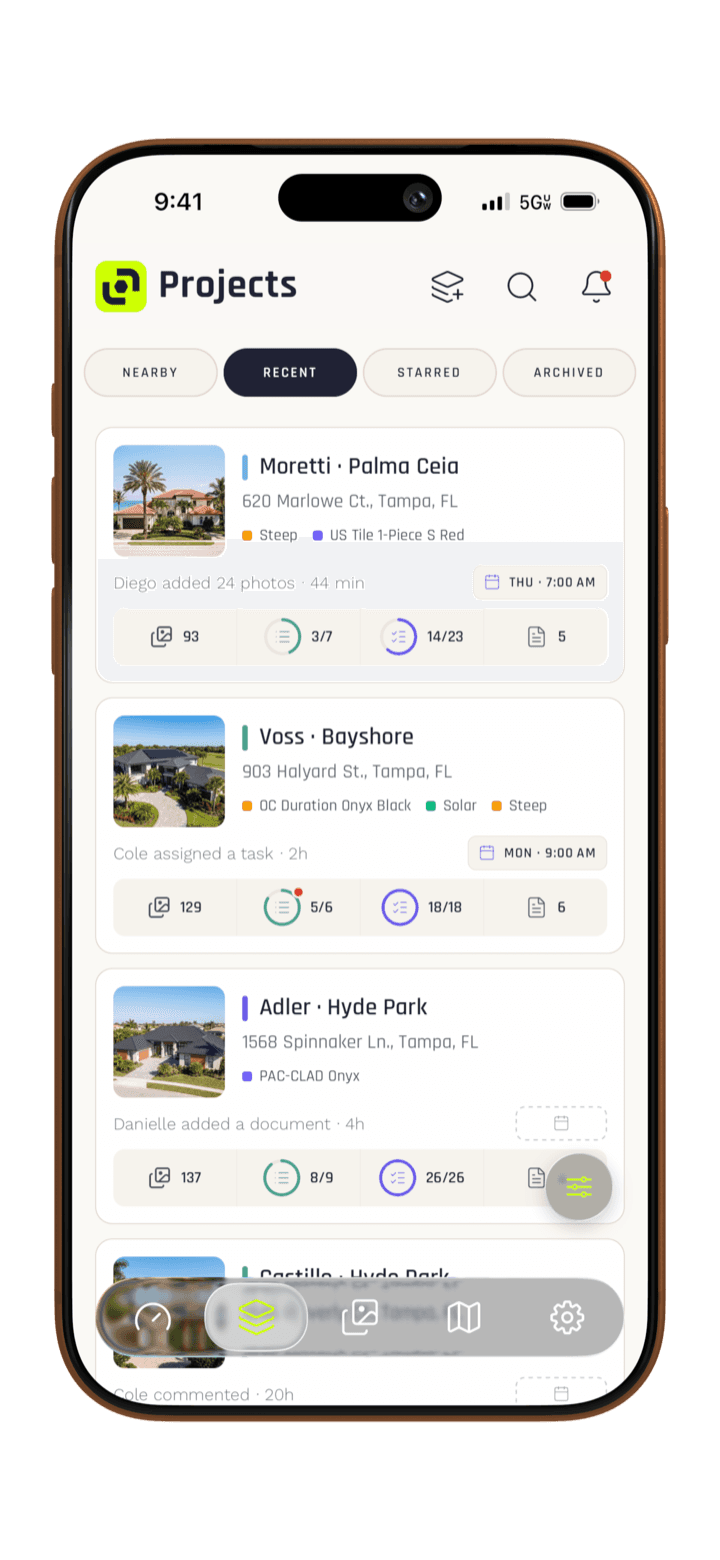
Get yourevenings back
Pull the tape to your team size.
Team size
Monthly total
$125.00/mo
Prepared forYour crew
Rate$12.50/user/mo
Total for 10 users$125.00/mo
30 days free · No credit card required
Shoot every stage of every job before it’s covered up, so you can prove what was there.


FramingFraming
Plumbing rough-inPlumbing
Electrical + insulationElectrical
DrywallDrywall
Tape + mudTape + mud
PaintPaint
“Pretty sure there’s no pipe there.”
Famous last words.
Your phone has a camera. Your camera roll isn’t a job file. In Project Lens, every shot is timestamped, geotagged and filed to its project, with the tasks, conversations and reports that go with it.
30 days free · No credit card required
In-app camera
Every shot files itself to the job, timestamped and geotagged. Nothing to dig out of your camera roll.
Markup
When something needs pointing out, circle it, arrow it or label it. The markup saves right on the photo.
Sharing
When the homeowner, the GC or the client asks, send a Gallery of the best shots, a photo report or the job’s live Time-Lapse.
Win the job before anyone swings a hammer, with estimates they sign.
Document every detail on the job with unlimited photos and video.
Keep the crew on the same page, from the first day to the punch list.
Show the client the work as it happens, then ask for the review.
Every contractor learns these once, usually the expensive way.
Timestamped photos on every job end the argument.
Shoot the job before you touch it. It files itself.
Turn the job’s photos into a clean report in minutes.
Before photos, filed on the job before you start.
Decking, framing, plumbing: shoot it before it’s buried.
Proof on every job, timestamped and organized.
No actors in spotless hard hats. Real crews, word for word.
Coordinating three fence crews used to mean constant phone calls and texts back and forth. Now my guys snap progress photos with notes, and I see everything in real-time from the office. I can check on any project without calling anyone, and the crew always knows what's next. Less time on the phone, fewer miscommunications, way fewer 'I thought you said...' moments. It has completely changed how we coordinate across every single jobsite day to day.
 Derek Hockett · Bay Area Fence Co.
I used to spend half my evening sorting through text messages and photo dumps from my subs. Now everything's logged automatically—photos, notes, progress updates—all in one place. I can keep projects moving without micromanaging or chasing people down. When a client asks for an update, I send them a professional PDF report in just minutes. Looks way more polished than forwarding a bunch of iPhone photos. Honestly it's a no-brainer for the price.
 Kelsey Medeiros · Gulf Coast Home Services
Before Project Lens, I was juggling 6 different roofing jobs and losing track of which photos went where. Now everything's organized by project automatically. My crews use the mobile app daily to capture photos and track progress—I can check on any job from my truck between sites instead of waiting until I'm back at the office. When it's time for an inspection, all the documentation is already tagged and ready. It's saved me hours every single week.
 Cory Schools · Lionheart Roofing
Documentation used to be a mess—random photos in my camera roll, scattered texts from the crew. Now my guys upload everything straight from the jobsite with notes attached. I review work the same day and catch issues early instead of finding out a week later when the client calls. Sharing progress updates with clients takes seconds, and it actually looks professional. I honestly don't know how we managed all our jobs before Project Lens.
 Victor Falcon · VF Painter & Decorator
Anything else? Email support@projectlens.io.
$12.50 per user per month when you subscribe in the web app. Each user gets Project Lens on iPhone, Android and desktop, with every feature included.
Apple takes a cut of every subscription bought in the iPhone app, so it costs $18 a user there. Subscribe in the web app for $12.50 a user, and use the same login on iPhone, Android and desktop.
Not when you subscribe in the web app. Add or remove a single user whenever your crew changes, and your bill is prorated. In the iPhone app, Apple's rules only allow plans with a set number of users.
Yes! You get a 30-day free trial with no strings attached and no credit card required.
Yes. Build them once as templates, require a photo to check an item off, and send the finished checklist to the client to sign. Once they sign, it's locked for good. Same plan as everything else.
Keep shooting. Offline Mode saves the last 50 projects you opened on your phone, so you can pick one and take photos and videos with no signal. They wait on your phone and upload once you're back in service with the app open.
Your photos are yours. Download any set as a ZIP, or connect Google Drive and every new photo and video is copied there automatically.
Everything else on the list is already checked off.
Punch listJob: your next one
Cancel anytime.


